Audio Bitrate Explained: CBR vs VBR vs ABR (With Comparison Chart)
Understand audio bitrate in simple terms. Compare CBR, VBR, and ABR encoding. Learn which bitrate is best for music (320kbps), podcasts (128kbps), and lossless audio. Includes bitrate comparison chart.
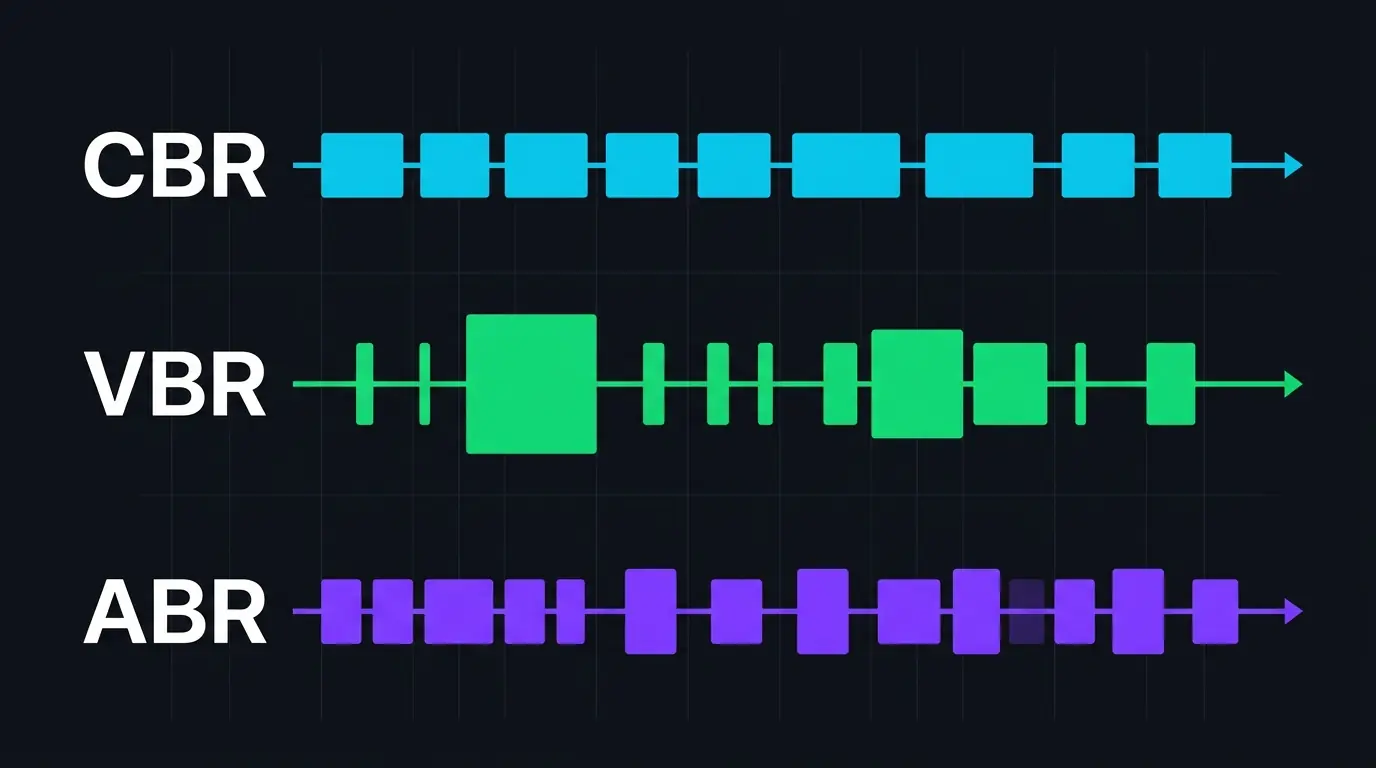
You've seen the numbers everywhere. 128 kbps. 256 kbps. 320 kbps. Maybe you've picked one from a dropdown menu when exporting audio and hoped for the best. But what does audio bitrate actually mean — and why do encoders give you three different ways to apply it? CBR, VBR, ABR. Three acronyms that look interchangeable and absolutely aren't. Getting this wrong won't ruin your audio, but understanding it properly means smaller files that sound better. That's a trade worth five minutes of reading.
What Bitrate Actually Measures
Bitrate is the amount of data used to represent one second of audio. It's measured in kilobits per second (kbps). Higher bitrate means more data per second, which generally means better audio quality — more room for the encoder to preserve detail.
A raw, uncompressed CD-quality audio stream (16-bit, 44.1 kHz, stereo) runs at 1,411 kbps. That's the full, uncompressed data rate. An MP3 at 128 kbps takes that 1,411 kbps stream and squeezes it down to roughly 9% of its original size. The encoder achieves this by using psychoacoustic models to identify and discard audio information your ears are unlikely to notice — masked frequencies, ultra-high tones beyond most adults' hearing range, quiet details hidden under louder sounds.
The question isn't really whether to compress. If you're distributing audio as MP3, AAC, or Opus, you've already decided to compress. The question is how the encoder allocates those precious kilobits across the duration of your audio. That's where CBR, VBR, and ABR come in. Three fundamentally different strategies for the same problem.
CBR: Constant Bitrate
CBR is exactly what the name suggests. You tell the encoder "use 192 kbps," and it uses 192 kbps for every single frame of audio. A quiet two-second gap between songs? 192 kbps. A dense, complex chorus with layered harmonies, cymbals crashing, and bass rumbling? Also 192 kbps.
How it works under the hood
An MP3 encoder processes audio in frames — each frame covers 1,152 samples, which at 44.1 kHz works out to roughly 26 milliseconds. In CBR mode, every frame gets the same number of bits. The encoder can't borrow bits from a simple frame to give to a complex one. What each frame gets is all it gets.
This creates an obvious inefficiency. During a spoken word passage or a fade-out, 192 kbps is more data than the encoder needs — it's wasting bits on near-silence. During a complex musical peak, 192 kbps might not be enough, forcing the encoder to make harder compromises about what to discard. The result: CBR files are larger than they need to be for simple passages and potentially lower quality than they could be for complex ones.
Why anyone still uses CBR
Predictability. A CBR file's size is perfectly predictable — multiply the bitrate by the duration and you know the exact file size. A 4-minute CBR MP3 at 192 kbps is always 5.6 MB. Always. This matters for streaming applications where a server needs to know exactly how much bandwidth to allocate, or for broadcast radio where the data pipe has a fixed capacity.
Hardware compatibility is the other reason. Some older MP3 players, car stereos, and embedded systems struggle with variable bitrate files. Their decoders expect a consistent data rate and can glitch, skip, or display incorrect duration info when they encounter VBR. This was a much bigger issue ten years ago, but legacy hardware still exists in the world.
CBR is best for: Streaming, broadcast, podcast RSS feeds, and situations where hardware compatibility is uncertain.
VBR: Variable Bitrate
VBR flips the approach entirely. Instead of fixing the bitrate and letting quality fluctuate, you fix the quality target and let the bitrate fluctuate. The encoder analyzes each frame of audio and assigns as many or as few bits as that specific frame needs to hit the desired quality level.
The quality-target system
Most VBR implementations use a quality scale rather than a bitrate number. LAME (the most widely used open-source MP3 encoder) uses V0 through V9, where V0 is highest quality and V9 is lowest. A LAME V0 encode typically averages around 245 kbps but can swing from as low as 32 kbps during silence to 320 kbps during complex passages. LAME V2 averages around 190 kbps with similar swing range.
FFmpeg's AAC encoder uses a quality scale too — -q:a 2 produces roughly equivalent quality to AAC 256 kbps CBR, but with a smaller average file size because it doesn't waste bits on simple frames.
Why VBR sounds better per byte
The math is simple. A CBR 192 kbps file and a VBR file averaging 192 kbps are roughly the same size. But the VBR file concentrated its bits where they were needed — more data for the complex chorus, less for the quiet intro. The complex sections sound better because they received more bits than CBR would have allowed, and the simple sections don't sound worse because they didn't need those bits anyway.
This is why audio encoding guides consistently recommend VBR over CBR for local listening. LAME V0 (averaging ~245 kbps) is widely considered transparent — indistinguishable from the CD source in controlled blind tests — while CBR at the same average bitrate would produce slightly more artifacts on complex passages.
The downsides
File size is unpredictable. A 4-minute track encoded at LAME V2 might be 5.2 MB or 6.8 MB depending on the musical content. Dense electronic music with lots of high-frequency detail uses more bits than a sparse acoustic recording. This unpredictability is a non-issue for personal music libraries but problematic for streaming infrastructure.
Seeking accuracy can also be impaired. Because frames vary in size, jumping to a specific timestamp in a VBR file requires the player to either scan from the beginning or use a seek table (Xing/VBRI header). Poorly encoded VBR files without proper seek tables can display wrong durations or jump to incorrect positions. Modern encoders handle this correctly, but it's been a historical pain point.
VBR is best for: Personal music libraries, archival encodes, any situation where you want maximum quality per MB and don't need predictable file sizes.
ABR: Average Bitrate
ABR is the compromise candidate. You tell the encoder "target an average of 192 kbps," and it varies the bitrate frame-to-frame like VBR — but with a constraint. It monitors the running average and adjusts its behavior to ensure the final file averages out to approximately your target bitrate. If it's been spending too many bits on recent frames, it'll tighten up on the next few.
How it differs from VBR in practice
The difference is subtle but real. A true VBR encoder doesn't care about file size at all — it targets a quality level and the bitrate falls wherever it falls. ABR cares about both quality and hitting a target file size. This means ABR occasionally compromises quality on a complex frame to stay on budget, or wastes bits on a simple frame to bring the average back up.
In real-world listening tests, ABR at a given average bitrate sounds slightly worse than VBR at the same average. Not dramatically — we're talking about a quality difference that requires attentive listening on good equipment to notice. But it's measurable and consistent.
When ABR actually makes sense
ABR is useful when you need a roughly predictable file size but still want some of VBR's efficiency. Podcast production is a good example. You might want your episodes to average around 64 kbps mono to keep hosting costs reasonable, but you want the encoder to have some flexibility to allocate more bits during complex speech segments (multiple speakers talking over each other, background music under narration) and fewer bits during single-speaker pauses.
Some streaming platforms and audio hosting services also use ABR internally — they need to budget bandwidth without being as rigid as CBR.
ABR is best for: Podcast distribution, situations where you need approximate file size control with some quality flexibility.
Audio Bitrate Explained: Real-World Comparison
Here's what a 4-minute stereo pop track (musically complex, lots of instruments and vocal layers) looks like across all three modes in LAME MP3:
| Mode | Setting | Avg Bitrate | File Size | Quality Verdict |
|---|---|---|---|---|
| CBR | 128 kbps | 128 kbps | 3.75 MB | Audible artifacts on cymbals, compressed stereo image |
| CBR | 192 kbps | 192 kbps | 5.63 MB | Clean for most content, slight softness in highs |
| CBR | 320 kbps | 320 kbps | 9.38 MB | Transparent — virtually indistinguishable from source |
| VBR | V2 (~190 kbps) | ~190 kbps | ~5.5 MB | Comparable to CBR 224 kbps in quality |
| VBR | V0 (~245 kbps) | ~245 kbps | ~7.2 MB | Transparent — matches CBR 320 with smaller file |
| ABR | 192 kbps target | ~192 kbps | ~5.6 MB | Between CBR 192 and VBR V2 in quality |
The standout line: VBR V0 achieves transparency at ~245 kbps average, while CBR needs 320 kbps for the same result. That's roughly 25% smaller files for the same perceived quality. Over a thousand-track library, that's gigabytes of difference.
What This Means for Different Workflows
Music production
Bitrate modes are irrelevant here. If you're producing, editing, or mixing, you should be working with uncompressed WAV or lossless FLAC. Bitrate only applies to lossy codecs, and lossy codecs don't belong in a production workflow. Export to lossy only as the very last step — final delivery to streaming platforms, podcast RSS, or personal listening copies.
Exporting final mixes for listening
VBR V0 in LAME (for MP3) or AAC at 256 kbps (for M4A) are the standard recommendations. Both produce transparent quality at reasonable file sizes. If you're distributing through Bandcamp, SoundCloud, or similar platforms, know that they'll re-encode your upload anyway — send them the highest quality source you can (ideally WAV or FLAC) and let their encoders handle the bitrate decisions.
Podcast distribution
CBR 128 kbps mono for speech-only shows. ABR 96 kbps mono if you want slightly smaller files with minimal quality loss. Some podcast hosts recommend specific settings — Spotify's specs suggest 96 kbps for speech and 128 kbps for shows with music segments. Keep your editing masters in WAV format so you can always re-export at different settings if a platform's requirements change.
Downloading from YouTube
YouTube's audio is already encoded as AAC at 128–256 kbps. When you convert YouTube audio to WAV, you're getting an uncompressed copy of that existing stream — no further bitrate decisions involved because WAV doesn't use lossy compression. This is the ideal approach for anyone planning to edit or process the audio further, since re-encoding an already-compressed stream into another lossy format (like MP3) means two rounds of quality loss instead of one.
The Bitrate Sweet Spots
After years of blind tests, forum debates, and practical encoding experience, the audio community has settled on some reliable sweet spots. For MP3, LAME V0 (~245 kbps VBR) is transparent for virtually all content. LAME V2 (~190 kbps VBR) is transparent for most content and an excellent default. CBR 320 kbps is overkill for listening but used as a distribution standard because the number is easy to communicate.
For AAC, 256 kbps CBR (Apple's iTunes Plus standard) is transparent. 128 kbps CBR (YouTube's standard audio quality) is acceptable for casual listening but audibly degraded on good headphones with critical material. For Opus — the newest and most efficient lossy codec — 128 kbps rivals AAC at 256 kbps.
Honestly, if you're agonizing over 256 vs 320 kbps for your personal music library, you're probably past the point of diminishing returns. The difference between them is measurable on an oscilloscope and inaudible on headphones for 99% of listeners and content. Spend that energy on better speakers instead.
FAQ
Does higher bitrate always mean better quality?
Up to a point, yes. But the relationship isn't linear. The jump from 64 kbps to 128 kbps is dramatic — clearly audible to anyone. From 128 to 192, it's noticeable on decent headphones. From 192 to 256, you'll hear it on specific content (cymbals, complex harmonics). From 256 to 320? Most people genuinely cannot tell the difference in blind tests. Beyond 320 kbps for MP3 or 256 kbps for AAC, you've hit the codec's transparency ceiling — extra bits add file size without improving perceived quality.
Is VBR safe to use everywhere now?
Almost. Every modern device, app, and platform handles VBR correctly — iPhones, Android phones, all major music players, all browsers, all streaming services. The only holdouts are certain legacy car stereos (pre-2012 era), some very old portable MP3 players, and a few niche embedded systems. If you're targeting one of those, use CBR. Otherwise, VBR is the better choice.
What bitrate does YouTube use for audio?
YouTube encodes audio as AAC at approximately 128 kbps for standard streams and up to 256 kbps for Premium quality. The exact bitrate can vary slightly depending on the video's encoding profile and the playback quality tier. YouTube's audio is always lossy — even the highest tier discards some frequency data compared to the original upload.
Does bitrate matter for WAV files?
Not in the way it matters for MP3 or AAC. WAV files have a fixed bitrate determined by their sample rate and bit depth — a 16-bit/44.1 kHz stereo WAV always runs at 1,411 kbps, a 24-bit/48 kHz stereo WAV at 2,304 kbps. You can't choose a bitrate when creating a WAV file because there's no compression involved. Every sample is stored at full precision. The concepts of CBR, VBR, and ABR only apply to lossy codecs that are making decisions about what data to keep and discard.
Try it yourself → Convert any YouTube video to lossless WAV audio with our free YouTube to WAV converter — no signup, no software, no limits.
Related Articles
- Audio Codecs Explained: MP3, AAC, Opus, FLAC & More — MP3, AAC, Opus, FLAC and how each encodes sound
- Lossless vs Lossy Audio: What's Actually Going On Inside Your Files — what happens inside compressed and uncompressed files
- WAV vs MP3 vs FLAC: Which Audio Format Should You Use? [2026 Guide] — definitive quality, size, and compatibility breakdown
- YouTube Audio Quality: What Format Does YouTube Actually Use? — what format and bitrate YouTube actually uses
Related Articles
Keep reading — these posts cover similar topics you might find useful.
Audio Codecs Explained: MP3, AAC, Opus, FLAC & More
Audio codecs explained in plain language — how MP3, AAC, Opus, FLAC, and Vorbis actually encode sound, where each one...
What Is Sample Rate in Audio? 44.1kHz, 48kHz, and 96kHz Explained
What is sample rate? Learn how sample rates like 44.1kHz, 48kHz, and 96kHz shape your audio quality — and which one t...
What Is Audio Metadata and Why It Matters
Audio metadata explained — what it is, what's stored inside your files, and why it matters for music production, podc...