What Is Bit Depth in Audio? 16-Bit vs 24-Bit Explained
What is bit depth in audio? Learn how 16-bit and 24-bit affect sound quality, dynamic range, and file size — plus when each one actually matters.
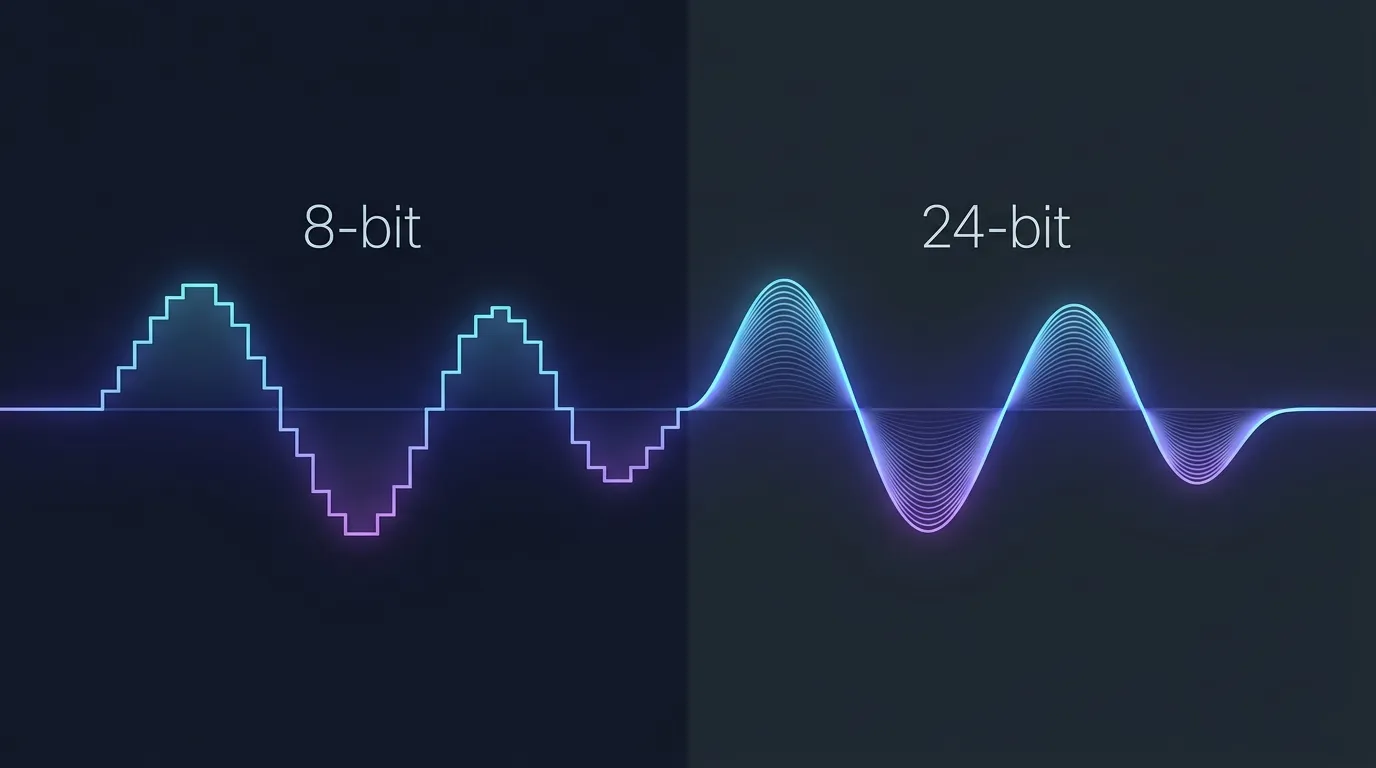
You've probably seen "16-bit" and "24-bit" on audio specs and thought: does this actually matter, or is it just another number to make gear look fancy? Fair question. Bit depth in audio is one of those concepts that sounds intimidating but is genuinely simple once someone explains it without burying you in math.
Here's the short version: bit depth determines how precisely a digital recording captures volume. Not pitch, not tone, not stereo width — just the resolution of loud-to-quiet. And that one detail affects everything from the hiss in your podcast recordings to whether a mastering engineer can rescue a track you recorded too quietly.
How Bit Depth Actually Works
Sound in the real world is analog — a continuous wave of air pressure changes. When you record it digitally, a converter takes thousands of snapshots per second (that's the sample rate) and for each snapshot, it measures how loud the signal is at that exact instant. Bit depth controls the precision of that measurement.
Think of it like a ruler. An 8-bit system has 256 possible volume levels to choose from. That's like measuring a room with a ruler that only has inch marks — you'll get close, but you're rounding constantly. A 16-bit system has 65,536 levels. Now you've got millimeter marks. And 24-bit? Over 16.7 million levels. You're measuring in microns at that point.
The Staircase Analogy
Every digital audio explanation trots out the "staircase" visual, and honestly, it's because it works. When fewer amplitude steps are available, the recorded waveform looks jagged — each sample gets rounded up or down to the nearest available step. The difference between the original smooth wave and the jagged digital approximation is called quantization error, and it shows up as a faint hissing or crackling noise.
More bits means more steps. More steps means smaller rounding errors. Smaller rounding errors means less noise. That's the entire concept.
Why Dynamic Range Is the Real Story
Here's where bit depth gets practical. Each bit of depth gives you roughly 6 dB of dynamic range — the gap between the quietest sound the system can capture and the absolute loudest before clipping.
| Format | Dynamic Range | Amplitude Levels | Typical Use |
|---|---|---|---|
| 8-bit | ~48 dB | 256 | Early video games, telephony |
| 16-bit | ~96 dB | 65,536 | CD audio, streaming, final delivery |
| 24-bit | ~144 dB | 16,777,216 | Studio recording, mixing, mastering |
| 32-bit float | ~1,528 dB | Enormous | DAW internal processing, field recording |
That 96 dB of 16-bit CD audio actually covers more dynamic range than most music ever uses. A loud rock concert might hit 115 dB SPL, and a quiet recording studio sits around 20–30 dB SPL. That's a spread of roughly 85–95 dB — comfortably within 16-bit territory. So for listening, 16-bit is genuinely excellent.
The problem isn't listening. It's recording.
16-Bit vs 24-Bit: When the Difference Actually Matters
Recording and Editing
When you're tracking audio — recording vocals, instruments, field sound — you don't always nail the perfect level. Maybe a singer whispers one line and belts the next. Maybe you set your gain conservatively to avoid clipping and end up with a recording that's pretty quiet.
With 16-bit recording, quiet signals sit dangerously close to the noise floor. If you need to boost a quiet passage by 20 dB in post, you're also boosting 20 dB of quantization noise. It's not catastrophic, but you'll hear it — a gritty texture behind the audio that no amount of noise reduction fully removes.
With 24-bit, that noise floor drops so low it's practically inaudible. You've got 48 dB of extra headroom beneath the 16-bit floor. Record too quietly? No problem — you can crank it up in Ableton, Pro Tools, Logic, or whatever your DAW is and the audio stays clean. That's why every professional studio records at 24-bit minimum. It's not because the music sounds "better" at 24-bit — it's because you have vastly more room to make mistakes and fix them later.
Mixing and Processing
Every time you apply an EQ, a compressor, or a reverb in your DAW, the software does math on your audio samples. Each calculation introduces tiny rounding errors. In a complex mix with 60+ tracks and dozens of plugins, those rounding errors compound.
This is actually why most modern DAWs — Ableton Live, FL Studio, Reaper, Logic Pro — process audio internally at 32-bit or even 64-bit floating point, regardless of your source file's bit depth. They're giving themselves enormous mathematical headroom so that processing artifacts stay far below anything you'd ever hear.
But the source still matters. Starting with a 24-bit recording gives the DAW more genuine detail to work with, compared to a 16-bit file where the quietest portions are already quantized more coarsely.
Casual Listening
Honestly? For listening to finished music through earbuds on a bus, 16-bit at 44.1 kHz (standard CD quality) is more than enough. Your listening environment has a noise floor of 70+ dB from traffic, conversation, and engine rumble. The theoretical advantage of 24-bit is completely masked by real-world noise.
Audiophile forums will argue this point until the heat death of the universe, but the science is pretty settled: properly dithered 16-bit audio is transparent to human hearing for playback purposes. The benefits of 24-bit are almost entirely in the production side.
Bit Depth vs Sample Rate — They're Not the Same Thing
People confuse these constantly. Bit depth is about amplitude resolution (volume precision). Sample rate is about temporal resolution (how many snapshots per second). They're independent.
A 16-bit/96 kHz file has the same dynamic range as a 16-bit/44.1 kHz file — about 96 dB. It just captures higher frequencies. A 24-bit/44.1 kHz file captures the same frequency range as the 16-bit version, but with 144 dB of dynamic range instead of 96.
For most people working with YouTube audio, the distinction matters here: when you convert a video to WAV, both the bit depth and sample rate of the output affect quality and file size. A 3-minute WAV at 16-bit/44.1 kHz runs about 30 MB. Bump that to 24-bit/48 kHz and you're looking at roughly 50 MB. The difference isn't trivial if you're batch-converting a dozen videos for a podcast or a remix project.
YTtoWAV.org offers both 16-bit/44.1 kHz (CD quality) and 24-bit/48 kHz (studio quality) options so you can choose based on what you're actually doing with the audio — not just default to the biggest numbers.
What About 32-Bit Float?
You might see "32-bit float" in your DAW's export settings and wonder if you should use it. Here's the deal: 32-bit float has a theoretical dynamic range exceeding 1,500 dB, which is absurdly, physically-impossibly more than any real-world sound. The entire audible range of human hearing is about 140 dB.
The real trick of 32-bit float isn't the dynamic range — it's that signals can exceed 0 dBFS without permanently clipping. Record too hot on a device like the Zoom F3 or Sound Devices MixPre (both record in 32-bit float), and you can turn the signal down later with zero distortion. That's genuinely remarkable technology for field recordists who can't monitor levels in real time.
For converting YouTube audio, though, 32-bit float is overkill. YouTube's source audio is AAC at 128–256 kbps — there's no hidden detail that a 32-bit float WAV would preserve that 24-bit wouldn't. You'd just get a larger file full of the same information.
Does Bit Depth Matter for YouTube Audio Conversion?
It does, but with a caveat. YouTube compresses everything to AAC (or Opus for some newer content), typically at 128 kbps for standard videos and up to 256 kbps for premium audio tracks. That's lossy compression — some audio data is permanently discarded.
When you convert YouTube to WAV, you're decoding that compressed stream into an uncompressed format. The WAV file won't magically add back the frequencies and detail that AAC compression removed. But what it does do is give you a format that won't lose any further quality when you import it into a DAW, apply effects, edit, and re-export. That's the whole point.
Choosing 16-bit WAV for this purpose is perfectly reasonable — you're preserving the decoded audio without introducing additional lossy compression. Choosing 24-bit gives you a bit more headroom if you plan to do heavy processing. Neither choice is wrong; it just depends on your workflow.
If you're curious about the practical differences between lossless and lossy formats beyond just bit depth, we've covered that in detail in our guide on WAV vs MP3 audio quality.
FAQ
What bit depth is CD quality?
CD audio is 16-bit at a 44.1 kHz sample rate. This gives approximately 96 dB of dynamic range and has been the standard for commercial music distribution since 1982. It remains the format for physical CDs today.
Can you hear the difference between 16-bit and 24-bit audio?
In a controlled, quiet listening environment with high-end headphones, most people cannot reliably distinguish between a properly dithered 16-bit master and its 24-bit source. The difference matters during recording and production — not playback. Your listening environment's background noise typically exceeds the noise floor of 16-bit audio.
Is 24-bit audio worth the larger file size?
For production work, absolutely. The extra headroom is invaluable when recording, mixing, or applying effects. For final listening copies stored on your phone or streamed through Spotify, 16-bit is sufficient and the smaller file size (roughly 33% smaller than 24-bit at the same sample rate) is a practical benefit.
What bit depth should I choose when converting YouTube to WAV?
If you're converting audio for casual listening or archiving, 16-bit/44.1 kHz is ideal — it preserves everything the source contained without unnecessary file bloat. If you plan to import the audio into a DAW for editing, remixing, or sampling, 24-bit/48 kHz gives you more processing headroom. YTtoWAV.org lets you choose either option before converting.
Related Articles
- 16-Bit vs 24-Bit Audio: What's the Difference? — when higher bit depth actually matters for your audio
- What Is Sample Rate in Audio? 44.1kHz, 48kHz, and 96kHz Explained — 44.1kHz, 48kHz, and 96kHz differences explained
- What Is Dynamic Range in Audio? The Complete Guide — the full guide to audio dynamic range and headroom
- WAV Audio Format: Everything You Need to Know [Complete 2026 Guide] — complete guide to WAV specifications, history, and usage
Related Articles
Keep reading — these posts cover similar topics you might find useful.
16-Bit vs 24-Bit Audio: What's the Difference?
16-bit vs 24-bit audio — what actually changes between these bit depths, when the difference matters, and when it's j...
What Is Audio Metadata and Why It Matters
Audio metadata explained — what it is, what's stored inside your files, and why it matters for music production, podc...
What Is Opus Audio? YouTube's Hidden Codec Explained
The opus audio format powers every YouTube video you watch. Here's what it is, why it replaced Vorbis, and what happe...